| [ Team LiB ] |
|
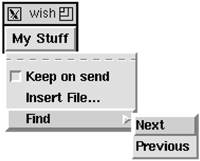
User-Defined MenusUser-defined menus can be set up with a similar scheme. However, it is more complex because there are no resources for specific menu entries. We must use more artificial resources to emulate this. We use menulist to name the set of menus. Then, for each of these, we define an entrylist resource. Finally, for each entry we define a few more resources. The name of the entry has to be combined with some type information, which leads to the following convention:
Example 31-6 Specifying menu entries via resources
*User.menulist: stuff
*User.stuff.text: My stuff
*User.stuff.m.entrylist: keep insert find
*User.stuff.m.l_keep: Keep on send
*User.stuff.m.t_keep: check
*User.stuff.m.v_keep: checkvar
*User.stuff.m.l_insert: Insert File...
*User.stuff.m.c_insert: InsertFileDialog
*User.stuff.m.l_find: Find
*User.stuff.m.t_find: cascade
*User.stuff.m.m_find: find
*User.stuff.m.find.entrylist: next prev
*User.stuff.m.find.tearoff: 0
*User.stuff.m.find.l_next: Next
*User.stuff.m.find.c_next: Find_Next
*User.stuff.m.find.l_prev: Previous
*User.stuff.m.find.c_prev: Find_Previous
In Example 31-6, .user.stuff is a Tk menubutton. It has a menu as its child, .user.stuff.m, where the menu .m is set by convention. You will see this later in the code for Resource_Menubar. The entrylist for the menu is similar in spirit to the buttonlist resource. For each entry, however, we have to be a little creative with the next level of resource names. The following does not work: *User.stuff.m.keep.label: Keep on send The problem is that Tk does not directly support resources for menu entries, so it assumes .stuff.m.keep is a widget pathname, but it is not. You can add the resource, but you cannot retrieve it with option get. Instead, we must combine the attribute information (i.e., label) with the name of the entry: *User.stuff.m.l_keep: Keep on send You must do something similar if you want to define resources for items on a canvas, too, because that is not supported directly by Tk. The code to support menu definition by resources is shown in the next example: Example 31-7 Defining menus from resource specifications
proc Resource_Menubar { f class } {
   set f [frame $f -class $class]
   pack $f -side top
   foreach b [option get $f menulist {}] {
      set cmd [list menubutton $f.$b -menu $f.$b.m \
                   -relief raised]
      if [catch $cmd t] {
         eval $cmd {-font fixed}
      }
      if [catch {menu $f.$b.m}] {
         menu $f.$b.m -font fixed
      }
      pack $f.$b -side left
      ResourceMenu $f.$b.m
   }
}
proc ResourceMenu { menu } {
   foreach e [option get $menu entrylist {}] {
      set l [option get $menu l_$e {}]
      set c [option get $menu c_$e {}]
      set v [option get $menu v_$e {}]
      switch -- [option get $menu t_$e {}] {
         check {
            $menu add checkbutton -label $l -command $c \
               -variable $v
         }
         radio {
            $menu add radiobutton -label $l -command $c \
               -variable $v -value $l
         }
         separator {
            $menu add separator
         }
         cascade {
            set sub [option get $menu m_$e {}]
            if {[string length $sub] != 0} {
               set submenu [menu $menu.$sub]
               $menu add cascade -label $l -command $c \
                       -menu $submenu
               ResourceMenu $submenu
            }
         }
         default {
            $menu add command -label $l -command $c
         }
      }
   }
}
Application and User ResourcesThe examples presented here are a subset of a package I use in some large applications, exmh and webtk. The applications define nearly every button and menu via resources, so users and site administrators can redefine them. The buttonlist, menulist, and entrylist resources are generalized into user, site, and application lists. The application uses the application lists for the initial configuration. The site and user lists can add and remove widgets. For example:
This idea and the initial implementation was contributed to exmh by Achim Bonet. The Resource_GetFamily procedure merges five sets of resources shown above. It can replace the option get commands for the buttonlist, menulist, and entrylist resources in Examples 31-4 and 31-7: Example 31-8 Resource_GetFamily merges user and application resources
proc Resource_GetFamily { w resname } {
   set res   [option get $w $resname {}]
   set lres  [option get $w l$resname {}]
   set ures  [option get $w u$resname {}]
   set l-res [option get $w l-$resname {}]
   set u-res [option get $w u-$resname {}]
   # Site-local deletions from application resources
   set list [lsubtract $res ${l-res}]
   # Site-local additions
   set list [concat $list $lres]
   # Per-user deletions
   set list [lsubtract $list ${u-res}]
   # Per-user additions
   return [concat $list $ures]
}
proc lsubtract { orig nuke } {
   # Remove elements in $nuke from $orig
   foreach x $nuke {
      set ix [lsearch $orig $x]
      if {$ix >= 0} {
         set orig [lreplace $orig $ix $ix]
      }
   }
   return $orig
}
Expanding VariablesIf the command resource contains substitution syntax like $ and [], then these are evaluated later when the command is invoked by the button or menu. This is because there is no interpretation of the command value when the widgets are created. However, it may be that you want variables substituted when the buttons and menus are defined. You can use the subst command to do this: set cmd [$button cget -command] $button config -command [subst $cmd] Choosing the scope for the subst can be tricky. The previous command does the subst in the current scope. If this is the Resource_ButtonFrame procedure, then there are no interesting application-specific variables defined. The next command uses uplevel to do the subst in the scope of the caller of Resource_ButtonFrame. The list is necessary so that uplevel preserves the structure of the original subst command. $button config -command [uplevel [list subst $cmd]] If you do a subst in ResourceMenu, then you need to keep track of the recursion level to get back to the scope of the caller of Resource_Menubar. The next few lines show what changes in ResourceMenu:
proc ResourceMenu { menu {level 1} } {
   foreach e [option get $menu entrylist {}] {
      # code omitted
      set c [option get $menu c_$e {}]
      set c [uplevel $level [list subst $c]]
      # And the recursive call is
      ResourceMenu $submenu [expr $level+1]
      # more code omitted
   }
}
If you want the subst to occur in the global scope, use this: $button config -command [uplevel #0 [list subst $cmd]] However, the global scope may not be much different when you define the button than when the button is invoked. In practice, I have used subst to capture variables defined in the procedure that calls Resource_Menubar.  |
| [ Team LiB ] |
|