| [ Team LiB ] |
|
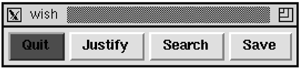
User-Defined ButtonsSuppose you want users to be able to define a set of their own buttons for frequently executed commands. Or perhaps users can augment the application with their own Tcl code. The following scheme, which is based on an idea from John LoVerso, lets them define buttons to invoke their own code or their favorite commands. The application creates a special frame to hold the user-defined buttons and places it appropriately. Assume the frame is created like this: frame .user -class User The class specification for the frame means that we can name resources for the widgets inside the frame relative to *User. Users specify the buttons that go in the frame via a personal file containing resource specifications. The first problem is that there is no means to enumerate the database, so we must create a resource that lists the names of the user-defined buttons. We use the name buttonlist and make an entry for *User.buttonlist that specifies which buttons are being defined. It is possible to use artificial resource names (e.g., buttonlist), but they must be relative to an existing Tk widget. Example 31-3 Using resources to specify user-defined buttons*User.buttonlist: save search justify quit *User.save.text: Save *User.save.command: File_Save *User.search.text: Search *User.search.command: Edit_Search *User.justify.text: Justify *User.justify.command: Edit_Justify *user.quit.text: Quit *User.quit.command: File_Quit *User.quit.background: red In Example 31-3, we have listed four buttons and specified some of the attributes for each, most importantly the text and command attributes. We are assuming, of course, that the application manual publishes a set of commands that users can invoke safely. In this simple example, the commands are all one word, but there is no problem with multiword commands. There is no interpretation done of the value, so it can include references to Tcl variables and nested command calls. Example 31-4 uses these resource specifications to define the buttons: Example 31-4 Resource_ButtonFrame defines buttons based on resources
proc Resource_ButtonFrame { f class } {
   frame $f -class $class -borderwidth 2
   pack $f -side top -fill x
   foreach b [option get $f buttonlist {}] {
      if [catch {button $f.$b}] {
         button $f.$b -font fixed
      }
      pack $f.$b -side right
   }
}
The catch phrase is introduced to handle a common problem with fonts and widget creation. If the user's resources specify a bogus or missing font, then the widget creation command will fail. The catch phrase guards against this case by falling back to the fixed font, which is guaranteed to exist. This problem is fixed in Tk 8.0 because the font mechanism will search for alternate fonts. Example 31-5 assumes that the resource specifications from Example 31-2 are in the file button.resources. It creates the user-defined buttons in the .users frame. Example 31-5 Using Resource_ButtonFrame
option readfile button.resources Resource_ButtonFrame .user User  |
| [ Team LiB ] |
|