| [ Team LiB ] |
|
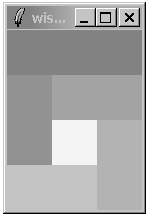
Spanning Rows and ColumnsA widget can occupy more than one cell. The -rowspan and -columnspan attributes indicate how many rows and columns are occupied by a widget. Example 26-7 uses explicit row, column, rowspan, and columnspan specifications: Example 26-7 Explicit row and column span
. config -bg white
foreach color {888 999 aaa bbb ccc fff} {
   frame .$color -bg #$color -width 40 -height 40
}
grid .888 -row 0 -column 0 -columnspan 3 -sticky news
grid .999 -row 1 -column 0 -rowspan 2 -sticky news
grid .aaa -row 1 -column 1 -columnspan 2 -sticky news
grid .bbb -row 2 -column 2 -rowspan 2 -sticky news
grid .ccc -row 3 -column 0 -columnspan 2 -sticky news
grid .fff -row 2 -column 1 -sticky news
You can also use special syntax in grid commands that imply row and column placement. Special characters represent a cell that is spanned or skipped:
A nice feature of the implicit row and column assignments is that it is easy to make minor changes to your layout. Example 26-8 achieves the same layout: Example 26-8 Grid syntax row and column span
. config -bg white
foreach color {888 999 aaa bbb ccc ddd fff} {
   frame .$color -bg #$color -width 40 -height 40
}
grid .888 -     -      -sticky news
grid .999 .aaa  -      -sticky news
grid ^    .fff  .bbb   -sticky news
grid .ccc -     ^      -sticky news
 |
| [ Team LiB ] |
|