The Editing Interface
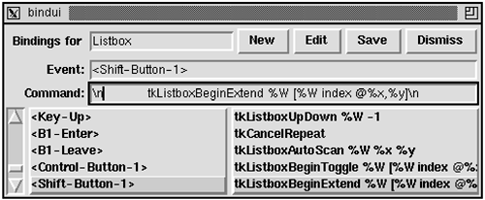
Editing and defining a new binding are done in a pair of entry widgets. These widgets are created and packed into the display dynamically when the user presses the New or Edit button:
Example 46-6 An interface to define bindings
proc Bind_New { frame } {
   if [catch {frame $frame.edit} f] {
      # Frame already created
      set f $frame.edit
   } else {
      foreach x {key cmd} {
         set f2 [frame $f.$x]
         pack $f2 -fill x -padx 2
         label $f2.l -width 11 -anchor e
         pack $f2.l -side left
         entry $f2.e
         pack $f2.e -side left -fill x -expand true
         bind $f2.e <Return> [list BindDefine $f]
      }
      $f.key.l config -text Event:
      $f.cmd.l config -text Command:
   }
   pack $frame.edit -after $frame.top -fill x
}
proc Bind_Edit { frame } {
   Bind_New $frame
   set line [$frame.key curselection]
   if {$line == {}} {
      return
   }
   $frame.edit.key.e delete 0 end
   $frame.edit.key.e insert 0 [$frame.key get $line]
   $frame.edit.cmd.e delete 0 end
   $frame.edit.cmd.e insert 0 [$frame.cmd get $line]
}
The -width 11 and -anchor e attributes for the label widgets are specified so that the Event: and Command: labels will line up with the Bindings for label at the top.
 | 
