| [ Team LiB ] |
|
The Mouse Cursor
On Unix systems, a foreground and background color for the cursor can be specified. Here are some example cursor specifications:
$w config -cursor watch             ;# stop-watch cursor
$w config -cursor {gumby blue}      ;# blue gumby
$w config -cursor {X_cursor red white}  ;# red X on white
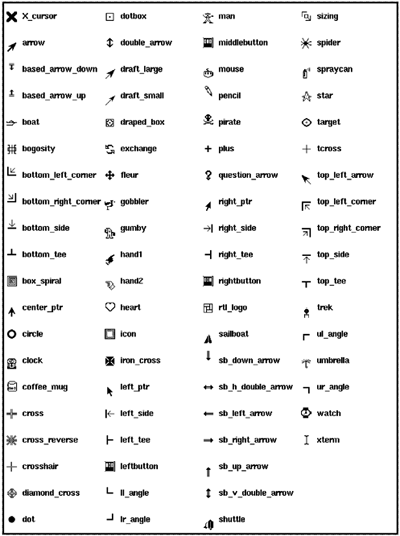
The other form for the cursor attribute specifies a file that contains the definition of the cursor bitmap. If two file names are specified, then the second specifies the cursor mask that determines what bits of the background get covered up. Bitmap editing programs like idraw and iconedit can be used to generate these files. Here are some example cursor specification using files. You need to specify a foreground color, and if you specify a mask file, then you also need to specify a background color: $w config -cursor "@timer.xbm black" $w config -cursor "@timer.xbm timer.mask black red" The cursors shown in Example 41-6 are available on all platforms. However, on Windows and Macintosh some of the cursors are mapped to native cursors and appear differently. On Windows the following cursors are mapped to native cursors: arrow, ibeam, icon, crosshair, fleur, sb_v_double_arrow, sb_h_double_arrow, center_ptr, watch, and xterm. These additional cursors are defined on Windows: starting, size, size_ne_sw, size_ns, size_nw_se, size_we, uparrow, and wait. On Windows, use the no cursor to eliminate the cursor. On Macintosh, the following cursors are mapped to native cursors: ibeam, xterm, cross, crosshair, plus, watch, arrow. These additional cursors are defined on Macintosh: text and cross-hair. As of Tk 8.3, when running on Windows you can also use Windows system cursors by specifying the name of the appropriate .ani or .cur file. For example: $w config -cursor @C:/WINNT/Cursors/globe.ani Example 41-6. The Tk cursors
 |
| [ Team LiB ] |
|