| [ Team LiB ] |
|
Using ListboxesManipulating Listbox ContentsThe lines in a listbox are indexed from zero. The keyword index end addresses the last line. Other indices are described on page 520. The most common programming task for a listbox is to insert text. If your data is in a list, you can loop through the list and insert each element at the end:
foreach item $list {
    $listbox insert end $item
}
You can insert several items at once. The next command uses eval to concatenate the list onto a single insert command:
eval {$listbox insert end} $list
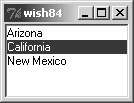
The delete operation deletes items from a listbox. You can delete either a single item or a range of items: $listbox delete 0 ;# Delete the first item $listbox delete 3 5 ;# Delete items 3-5, inclusive The listbox widget gained a listvariable option in Tk 8.3, which works analogously to textvariable attributes in other widgets. You give listvariable the name of a variable that contains a list value. Tk then keeps the value of the variable and the listbox contents synchronized, so that each element in the variable's value is a line in the listbox. Example 35-1 shows a simple example of modifying a listbox through its linked listvariable. Example 35-1 Using -listvariable to link a listbox and variable
listbox .choices -height 5 -width 20 -listvariable states
pack .choices
lappend states Arizona
lappend states California "New Mexico"
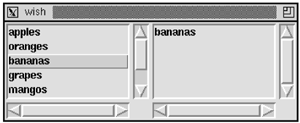
Programming ListboxesIt is also common to react to mouse clicks on a listbox, although the default bindings handle most of the details of selecting items. The nearest operation finds the listbox entry that is closest to a mouse event. If the mouse is clicked beyond the last element, the index of the last element is returned: set index [$list nearest $y] Example 35-2 displays two listboxes. The Scrolled_Listbox procedure on page 502 is used to put scrollbars on the listboxes. When the user clicks on an item in the first listbox, it is copied into the second listbox. When an item in the second listbox is selected, it is removed. This example shows how to manipulate items selected from a listbox: Example 35-2 Choosing items from a listbox
proc List_Select { parent values } {
   # Create two lists side by side
   frame $parent
   set choices [Scrolled_Listbox $parent.choices \
      -width 20 -height 5 ]
   set picked [Scrolled_Listbox $parent.picked \
      -width 20 -height 5]
   pack $parent.choices $parent.picked -side left \
      -expand true -fill both

   # Selecting in choices moves items into picked
   bind $choices <ButtonRelease-1> \
      [list ListTransferSel %W $picked]

   # Selecting in picked deletes items
   bind $picked <ButtonRelease-1> \
      {ListDeleteSel %W %y}

   # Insert all the choices
   foreach x $values {
      $choices insert end $x
   }
}
proc ListTransferSel {src dst} {
   foreach i [$src curselection] {
      $dst insert end [$src get $i]
   }
}
proc ListDeleteSel {w y} {
   foreach i [lsort -integer -decreasing [$w curselection]] {
      $w delete $i
   }
}
proc List_SelectValues {parent} {
   set picked $parent.picked.list
   set result {}
   foreach i [$w curselection] {
      lappend result [$w get $i]
   }
}
List_Select .f {apples oranges bananas \
             grapes mangos peaches pears}
pack .f -expand true -fill both
Bindings are created to move items from $choices to $picked, and to delete items from $picked. Most of the work of selecting things in the listbox is done by the built-in bindings on the Listbox binding tag. The different selection models are described on page 525. Those bindings are on <ButtonPress-1> and <B1-Motion>. The selection is complete by the time the <ButtonRelease-1> event occurs. Consider the <ButtonRelease-1> binding for $choices:
bind $choices <ButtonRelease-1> \
    [list ListTransferSel %W $picked]
The list command is used to construct the Tcl command because we need to expand the value of $picked at the time the binding is created. The command will be evaluated later at the global scope, and picked will not be defined after the List_Select procedure returns. Or, worse yet, an existing global variable named picked will be used, which is unlikely to be correct! Short procedures are used to implement the binding commands. This style has two advantages. First, it confines the % substitutions done by bind to a single command. Second, if there are any temporary variables, such as the loop counter i, they are hidden within the scope of the procedure. The ListTransferSel gets the list of all the selected items and loops over this list to insert them into the other list. The ListDeleteSel procedure is similar. However, it sorts the selection indices in reverse order. It deletes items from the bottom up so the indices remain valid throughout the process. |
| [ Team LiB ] |
|