| [ Team LiB ] |
|
Using ScrollbarsThe following commands create a text widget and two scrollbars that scroll it horizontally and vertically:
scrollbar .yscroll -command {.text yview} -orient vertical
scrollbar .xscroll -command {.text xview} -orient horizontal
text .text -yscrollcommand {.yscroll set} \
   -xscrollcommand {.xscroll set}
The scrollbar's set operation is designed to be called from other widgets when their display changes. The scrollable widget's xview and yview operations are designed to be called by the scrollbar when the user manipulates them. Additional parameters are passed to these operations as described later. In most cases you can ignore the details of the protocol and just set up the connection between the scrollbar and the widget. Example 33-1 A text widget and two scrollbars
proc Scrolled_Text { f args } {
   frame $f
   eval {text $f.text -wrap none \
      -xscrollcommand [list $f.xscroll set] \
      -yscrollcommand [list $f.yscroll set]} $args
   scrollbar $f.xscroll -orient horizontal \
      -command [list $f.text xview]
   scrollbar $f.yscroll -orient vertical \
      -command [list $f.text yview]
   grid $f.text $f.yscroll -sticky news
   grid $f.xscroll -sticky news
   grid rowconfigure $f 0 -weight 1
   grid columnconfigure $f 0 -weight 1
   return $f.text
}
set t [Scrolled_Text .f -width 40 -height 8 \
   -font {courier 12}]
pack .f -side top -fill both -expand true
set in [open [file join $tk_library demos colors.tcl]]
$t insert end [read $in]
close $in
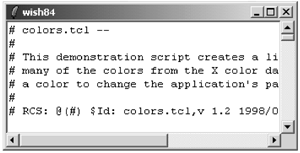
Example 33-1 defines Scrolled_Text that creates a text widget with two scrollbars. It reads and inserts one of the Tk demo files into the text widget. There is not enough room to display all the text, and the scrollbars indicate how much text is visible. Chapter 36 describes the text widget in more detail. The list command constructs the -command and -xscrollcommand values. Even though one could use double quotes here, you should make a habit of using list when constructing values that are used later as Tcl commands. Example 33-1 uses args to pass through extra options to the text widget. The use of eval and args is explained in Example 10-3 on page 136. The scrollbars and the text widget are lined up with the grid geometry manager as explained in Example 26-10 on page 417. |
| [ Team LiB ] |
|