Anchoring
If a widget is left with more packing space than display space, you can position it within its packing space using the -anchor packing option. The default anchor position is center. The other options correspond to points on a compass: n, ne, e, se, s, sw, w, and nw:
Example 25-14 Setup for anchor experiments
# Make the main window black
. config -bg black
# Create two frames to hold open the cavity
frame .prop -bg white -height 80 -width 20
frame .base -width 120 -height 20 -bg grey50
pack .base -side bottom
# Float a label and the prop in the cavity
label .foo -text Foo
pack .prop .foo -side right -expand true
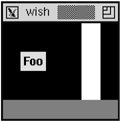
The .base frame is packed on the bottom. Then the .prop frame and the .foo label are packed to the right with expand set but no fill. Instead of being pressed up against the right side, the expand gives each of these widgets half of the extra space in the X direction. Their default anchor of center results in the positions shown. The next example shows some different anchor positions:
Example 25-15 The effects of noncenter anchors
. config -bg black
# Create two frames to hold open the cavity
frame .prop -bg white -height 80 -width 20
frame .base -width 120 -height 20 -bg grey50
pack .base -side bottom
# Float the label and prop
# Change their position with anchors
label .foo -text Foo
pack .prop -side right -expand true -anchor sw
pack .foo -side right -expand true -anchor ne
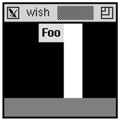
The label has room on all sides, so each of the different anchors will position it differently. The .prop frame only has room in the X direction, so it can only be moved into three different positions: left, center, and right. Any of the anchors w, nw, and sw result in the left position. The anchors center, n, and s result in the center position. The anchors e, se, and ne result in the right position.
If you want to see all the variations, type in the following commands to animate the different packing anchors. The update idletasks forces any pending display operations. The after 500 causes the script to wait for 500 milliseconds:
Example 25-16 Animating the packing anchors
foreach anchor {center n ne e se s sw w nw center} {
   pack .foo .prop -anchor $anchor
   # Update the display
   update idletasks
   # Wait half a second
   after 500
}
| 
