| [ Team LiB ] |
|
Integrating TclHttpd with Your ApplicationThe bulk of this chapter describes the various ways you can extend the server and integrate it into your application. TclHttpd is interesting because, as a Tcl script, it is easy to add to your application. Suddenly your application has an interface that is accessible to Web browsers in your company's intranet or the global Internet. The Web server provides several ways you can connect it to your application:
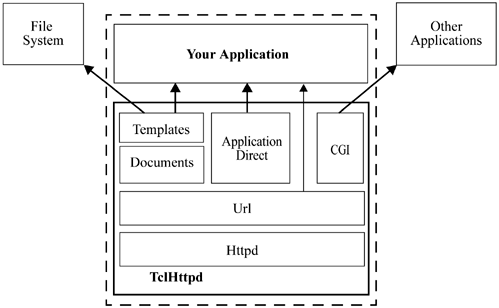
TclHttpd ArchitectureYou may find it helpful to read the code to learn more about the features of the server. In this section, there are references to Tcl files in the source, which are in the lib directory of the distribution that is on the CD-ROM. Figure 18-1 shows the basic components of the server. At the core is the Httpd module (httpd.tcl), which implements the server side of the HTTP protocol. The "d" in Httpd stands for daemon, which is the name given to system servers on UNIX. This module manages network requests, dispatches them to the Url module, and provides routines used to return the results to requests. Figure 18-1. The dotted box represents one application that embeds TclHttpd. Document templates and Application Direct URLs provide direct connections from an HTTP request to your application. You can also implement completely custom URL handlers.
The Url module (url.tcl) divides the Web site into domains, which are subtrees of the URL hierarchy provided by the server. The idea is that different domains may have completely different implementations. For example, the Document domain (doc.tcl) maps its URLs into files and directories on your hard disk, while the Application Direct domain (direct.tcl) maps URLs into Tcl procedure calls within your application. The CGI domain (cgi.tcl) maps URLs onto other programs that compute Web pages. Adding Code to TclHttpdThe TclHttpd distribution, which is described in more detail starting at page 284, is set up so you can easily add code for your application into the server. For simple applications, you simply put your files into a special directory for custom code, and the server loads them automatically upon startup. These files should define Tcl procedures and register them as Domain Handlers, Direct URL handlers, or Document handlers. Example 18-1 implements /hello/world: Example 18-1 The hello.tcl file implements /hello/world
Direct_Url /hello Hello
proc Hello/world {} {
   return "<b>Hello, World!</b>"
}
Suppose you put that file into the directory /tmp/tclhttpd_test. Then you can start the server like this: tclsh8.3 bin/httpd.tcl -library /tmp/tclhttpd_test -debug 1 Now access this URL:
Custom Main ProgramsThe TclHttpd main program, bin/httpd.tcl, may conflict with the main program of your existing application. For those applications that embed Tcl interpreters in a more custom manner, you will need to modify bin/httpd.tcl for use with your application. That script is not very big, and it is well-commented. The key elements are the Httpd_Server call that opens the listening socket for the Web server, and the vwait at the very end that activates the event loop. The rest is all about argument parsing and initializing the various modules that support the server. It is those aspects that may differ for your custom server application. |
| [ Team LiB ] |
|