https://monadical.com/posts/shades-of-rust-gui-library-list.html
[logo]
* Services
* Principles
* Portfolio
* Team
* Blog
GET A TECHNICAL ASSESSMENT
[img-team-0] [img-home-0] [img-home-0] [img-team-0]
27401 views
# 50 Shades of Rust **Or emerging Rust GUIs in a WASM
world** *Written by Igor Loskutov. Originally published
2023-04-26 on the [Monadical blog](https://monadical.com/blog.html).*
GUI in Rust progresses with unprecedented speed - 3 months
in Rust GUI-land is like 3 years in the mortal world. To put things
in perspective, GUI moves so fast for the web that it's even ahead of
browsers. There are many possible reasons for this, from the
cross-platform nature of Rust to the WebAssembly support, which
provides easier distribution of software. In this post, I'll review
the current toolkit for GUI in Rust, and share some tips for building
WebAssembly bundles. Due to the speed at which GUI in Rust moves,
some tools I've outlined below may deprecate in the near future. So,
at the risk of this post becoming obsolete before you've finished
reading it, let's dive into the most current GUI architecture for
Rust that I've discovered thus far. ## The current toolkit Before we
get into the toolkit, please note that I mention Elm Architecture and
Immediate Mode many times here, although their definitions are beyond
the scope of this post. However, you can think of [Elm Architecture]
(https://guide.elm-lang.org/architecture/) as roughly similar to
Redux (if you have experience with it), and you can consider
[Immediate Mode](https://en.wikipedia.org/wiki/Immediate_mode_GUI)
more imperative than Elm. It's also worth mentioning that many
libraries have now started using "signal" reactive semantics, where
you mutate your state variables directly; this is then reflected in
the UI automatically, just like we had in the times of Angular 1.
Now, onto the toolkit. ### 1. [Dioxus](https://github.com/DioxusLabs/
dioxus) **Dioxus** has a react-like interface architecture, but on
Rust. For Desktop builds, it uses Tauri, focuses on the Web, has
experimental Terminal support, and has an SSR feature for generating
server-side markup. Dioxus also implements React-like interior
mutability for data handling with, for example, `use_state`. Because
of its global state management through useContext-like API, potential
Redux-like tools [can be integrated through it](https://
dioxuslabs.com/docs/0.3/guide/en/roadmap.html) ("redux/recoil/mobx on
top of context"). Below is an example widget built with Dioxus:
```rust // main.rs fn main() { // launch the
web app dioxus_web::launch(App); } fn echo_to_angle(s: &str) -> u32 {
let mut angle = 0; for c in s.chars() { angle += c as u32 % 360; }
angle } fn App(cx: Scope) -> Element { let echo = use_state(&cx, ||
"Echo".to_string()); let angle = use_state(&cx, || echo_to_angle(&
echo.get())); cx.spawn({ let mut angle = angle.to_owned(); async move
{ TimeoutFuture::new(50).await; angle.with_mut(|a| { *a += 1; *a = *a
% 360; }); } }); cx.render(rsx! { div { div { "Angle: {angle}" } div
{ transform: "rotateX({angle}deg) rotateY({angle}deg)", width:
"100px", height: "100px", transform_style: "preserve-3d", position:
"relative", div { position: "absolute", width: "100%", height:
"100%", background: "red", transform: "translateZ(50px)", } // more
cube sides CSS definitions omitted div { position: "absolute", width:
"100%", height: "100%", background: "orange", transform: "rotateY
(90deg) translateZ(50px)", } } } }) } ``` ### 2. [Tauri](https://
github.com/tauri-apps/tauri) **Tauri** is a framework to create
desktop apps (with mobile platforms coming soon), like [Electron]
(https://github.com/electron/electron), written in Rust. Tauri gives
its own window interface to the app and lets you run TS code that
talks with Rust through a custom promise-based protocol. It's not
Tauri's purpose to be buildable for the web, although it leverages
web technologies for desktop apps. You can use many frontend
libraries, like React (provided in their init scripts), or just go
vanilla. 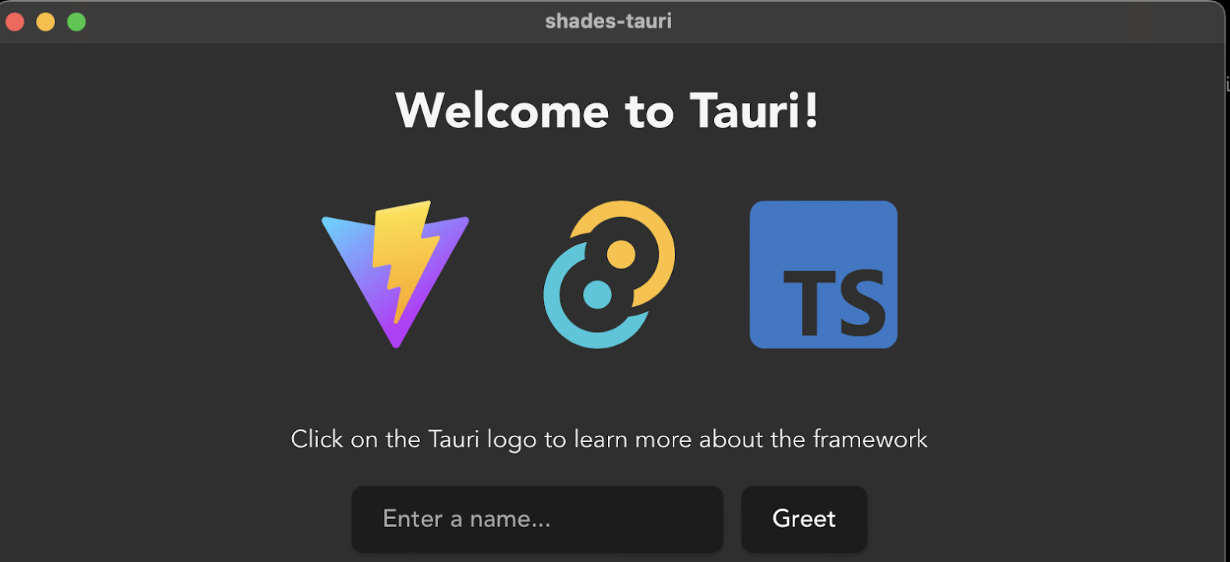 ```htmlbars
``` ```typescript // main.ts
import { invoke } from "@tauri-apps/api/tauri"; let greetInputEl:
HTMLInputElement | null; let greetMsgEl: HTMLElement | null; async
function greet() { if (greetMsgEl && greetInputEl) { // Learn more
about Tauri commands at https://tauri.app/v1/guides/features/command
greetMsgEl.textContent = await invoke("greet", { name:
greetInputEl.value, }); } } window.addEventListener
("DOMContentLoaded", () => { greetInputEl = document.querySelector("#
greet-input"); greetMsgEl = document.querySelector("#greet-msg");
document .querySelector("#greet-button") ?.addEventListener("click",
() => greet()); }); ``` ```rust //main.rs #[tauri::command] fn greet
(name: &str) -> String { format!("Hello, {}! You've been greeted from
Rust!", name) } fn main() { tauri::Builder::default() .invoke_handler
(tauri::generate_handler![greet]) .run(tauri::generate_context!())
.expect("error while running tauri application"); } ``` ### 3.
[Xilem](https://github.com/linebender/xilem) **Xilem** is an
experimental but very promising attempt at the data-first
architecture that aligns well with Rust's language architecture^
[Notably, it means avoiding a shared mutable state and using Rust
type inference at its fullest.]. It's the successor of [Druid](https:
//github.com/linebender/druid). The library's author Raph Levien
stated that "Xilem aims to be the premier UI library for Rust,
drawing considerable inspiration from SwiftUI, with a serious focus
on performance." Please check out his entire article on Rust UI
architecture: https://raphlinus.github.io/rust/gui/2022/05/07/
ui-architecture.html. It's the best article on this topic to date, in
my opinion. Based on this article, the natural decision is to choose
a centralized state like in Elm architecture. The library uses its
own renderer and is about to start heavily utilizing GPU features for
even faster rendering. The project is at a very early experimental
stage at the moment. It currently targets WebGPU, which is
problematic to run in the browser at this point, but it has a lot of
promise. ### 4. [Iced](https://github.com/iced-rs/iced) **Iced** is
["a cross-platform GUI library for Rust focused on simplicity and
type-safety."](https://github.com/iced-rs/iced). It uses Elm
architecture and a reactive programming model. By default, web builds
use DOM to render, but Iced can be used with other backends, too,
like wgpu or glow. The web part seems a bit overlooked right now
(https://github.com/iced-rs/iced_web), and it [hasn't been updated in
a while](https://www.reddit.com/r/rust/comments/12zjysp/comment/
jht57yc/). Here, their built Bezier tool employs Canvas: ```rust // main.rs //! This example showcases an
interactive `Canvas` for drawing Bezier curves. use iced::widget::
{button, column, text}; use iced::{Alignment, Element, Length,
Sandbox, Settings}; pub fn main() -> iced::Result { Example::run
(Settings { antialiasing: true, ..Settings::default() }) } #[derive
(Default)] struct Example { bezier: bezier::State, curves: Vec
, } #[derive(Debug, Clone, Copy)] enum Message {
AddCurve(bezier::Curve), Clear, } impl Sandbox for Example { type
Message = Message; fn new() -> Self { Example::default() } fn title(&
self) -> String { String::from("Bezier tool - Iced") } fn update(&mut
self, message: Message) { match message { Message::AddCurve(curve) =>
{ self.curves.push(curve); self.bezier.request_redraw(); }
Message::Clear => { self.bezier = bezier::State::default();
self.curves.clear(); } } } fn view(&self) -> Element {
column![ text("Bezier tool example").width(Length::Shrink).size(50),
self.bezier.view(&self.curves).map(Message::AddCurve), button
("Clear").padding(8).on_press(Message::Clear), ] .padding(20)
.spacing(20) .align_items(Alignment::Center) .into() } } mod bezier {
use iced::mouse; use iced::widget::canvas::event::{self, Event}; use
iced::widget::canvas::{ self, Canvas, Cursor, Frame, Geometry, Path,
Stroke, }; use iced::{Element, Length, Point, Rectangle, Theme}; #
[derive(Default)] pub struct State { cache: canvas::Cache, } impl
State { pub fn view<'a>(&'a self, curves: &'a [Curve]) -> Element<'a,
Curve> { Canvas::new(Bezier { state: self, curves, }) .width
(Length::Fill) .height(Length::Fill) .into() } pub fn request_redraw
(&mut self) { self.cache.clear() } } struct Bezier<'a> { state: &'a
State, curves: &'a [Curve], } impl<'a> canvas::Program for
Bezier<'a> { type State = Option; fn update( &self, state: &
mut Self::State, event: Event, bounds: Rectangle, cursor: Cursor, )
-> (event::Status, Option) { let cursor_position = if let Some
(position) = cursor.position_in(&bounds) { position } else { return
(event::Status::Ignored, None); }; match event { Event::Mouse
(mouse_event) => { let message = match mouse_event {
mouse::Event::ButtonPressed(mouse::Button::Left) => { match *state {
None => { *state = Some(Pending::One { from: cursor_position, });
None } Some(Pending::One { from }) => { *state = Some(Pending::Two {
from, to: cursor_position, }); None } Some(Pending::Two { from, to })
=> { *state = None; Some(Curve { from, to, control: cursor_position,
}) } } } _ => None, }; (event::Status::Captured, message) } _ =>
(event::Status::Ignored, None), } } fn draw( &self, state: &
Self::State, _theme: &Theme, bounds: Rectangle, cursor: Cursor, ) ->
Vec { let content = self.state.cache.draw(bounds.size(), |
frame: &mut Frame| { Curve::draw_all(self.curves, frame);
frame.stroke( &Path::rectangle(Point::ORIGIN, frame.size()),
Stroke::default().with_width(2.0), ); }); if let Some(pending) =
state { let pending_curve = pending.draw(bounds, cursor); vec!
[content, pending_curve] } else { vec![content] } } fn
mouse_interaction( &self, _state: &Self::State, bounds: Rectangle,
cursor: Cursor, ) -> mouse::Interaction { if cursor.is_over(&bounds)
{ mouse::Interaction::Crosshair } else { mouse::Interaction::default
() } } } #[derive(Debug, Clone, Copy)] pub struct Curve { from:
Point, to: Point, control: Point, } impl Curve { fn draw_all(curves:
&[Curve], frame: &mut Frame) { let curves = Path::new(|p| { for curve
in curves { p.move_to(curve.from); p.quadratic_curve_to
(curve.control, curve.to); } }); frame.stroke(&curves,
Stroke::default().with_width(2.0)); } } #[derive(Debug, Clone, Copy)]
enum Pending { One { from: Point }, Two { from: Point, to: Point }, }
impl Pending { fn draw(&self, bounds: Rectangle, cursor: Cursor) ->
Geometry { let mut frame = Frame::new(bounds.size()); if let Some
(cursor_position) = cursor.position_in(&bounds) { match *self {
Pending::One { from } => { let line = Path::line(from,
cursor_position); frame.stroke(&line, Stroke::default().with_width
(2.0)); } Pending::Two { from, to } => { let curve = Curve { from,
to, control: cursor_position, }; Curve::draw_all(&[curve], &mut
frame); } }; } frame.into_geometry() } } } ``` ### 5. [Egui](https://
github.com/emilk/egui) **Egui** is "the easiest to use GUI library."
[https://github.com/emilk/egui]. It utilizes Immediate Mode GUI
architecture [https://en.wikipedia.org/wiki/Immediate_mode_GUI]. Some
of its goals are to be portable and easy to use. The native look is
specifically a non-goal. For example, it fits simple GUIs, games, or
other apps that need a quick GUI drop-in library. Check out their
example build for WebAssembly:
```rust // app.rs // main.rs / lib.rs boilerplate omitted /// We
derive Deserialize/Serialize so we can persist app state on shutdown.
#[derive(serde::Deserialize, serde::Serialize)] #[serde(default)] //
if we add new fields, give them default values when deserializing old
state pub struct TemplateApp { // Example stuff: label: String, //
this how you opt-out of serialization of a member #[serde(skip)]
value: f32, } impl Default for TemplateApp { fn default() -> Self {
Self { // Example stuff: label: "Hello World!".to_owned(), value:
2.7, } } } impl TemplateApp { /// Called once before the first frame.
pub fn new(cc: &eframe::CreationContext<'_>) -> Self { // This is
also where you can customize the look and feel of egui using //
`cc.egui_ctx.set_visuals` and `cc.egui_ctx.set_fonts`. // Load
previous app state (if any). // Note that you must enable the
`persistence` feature for this to work. if let Some(storage) =
cc.storage { return eframe::get_value(storage,
eframe::APP_KEY).unwrap_or_default(); } Default::default() } } impl
eframe::App for TemplateApp { /// Called by the frame work to save
state before shutdown. fn save(&mut self, storage: &mut dyn
eframe::Storage) { eframe::set_value(storage, eframe::APP_KEY, self);
} /// Called each time the UI needs repainting, which may be many
times per second. /// Put your widgets into a `SidePanel`, `TopPanel
`, `CentralPanel`, `Window` or `Area`. fn update(&mut self, ctx: &
egui::Context, _frame: &mut eframe::Frame) { let Self { label, value
} = self; // Examples of how to create different panels and windows.
// Pick whichever suits you. // Tip: a good default choice is to just
keep the `CentralPanel`. // For inspiration and more examples, go to
https://emilk.github.io/egui #[cfg(not(target_arch = "wasm32"))] //
no File->Quit on web pages! egui::TopBottomPanel::top
("top_panel").show(ctx, |ui| { // The top panel is often a good place
for a menu bar: egui::menu::bar(ui, |ui| { ui.menu_button("File", |ui
| { if ui.button("Quit").clicked() { _frame.close(); } }); }); });
egui::SidePanel::left("side_panel").show(ctx, |ui| { ui.heading("Side
Panel"); ui.horizontal(|ui| { ui.label("Write something: ");
ui.text_edit_singleline(label); }); ui.add(egui::Slider::new(value,
0.0..=10.0).text("value")); if ui.button("Increment").clicked() {
*value += 1.0; } ui.with_layout(egui::Layout::bottom_up
(egui::Align::LEFT), |ui| { ui.horizontal(|ui| { ui.spacing_mut
().item_spacing.x = 0.0; ui.label("powered by "); ui.hyperlink_to
("egui", "https://github.com/emilk/egui"); ui.label(" and ");
ui.hyperlink_to( "eframe", "https://github.com/emilk/egui/tree/master
/crates/eframe", ); ui.label("."); }); }); });
egui::CentralPanel::default().show(ctx, |ui| { // The central panel
the region left after adding TopPanel's and SidePanel's ui.heading
("Shades of Rust - egui"); ui.hyperlink("https://github.com/Firfi/
shades-of-rust/tree/master/shades-egui"); egui::warn_if_debug_build
(ui); }); } } ``` Note their bigger demo on https://www.egui.rs/#demo
### 6. [Kas](https://github.com/kas-gui/kas) **Kas** is an
["efficient retained-state toolkit,"](https://kas-gui.github.io/blog/
state-of-GUI-2022.html#details) and a blend of several GUI data
models. For example, it handles messages like Elm but is able to keep
state in components. It doesn't work in the browser environment yet;
at least, I haven't been able to build an example quickly enough.
This is because it's a bit ahead of browsers using WebGPU - [not the
other way around](https://github.com/gfx-rs/wgpu/wiki/
Running-on-the-Web-with-WebGPU-and-WebGL). ### 7. [Slint](https://
github.com/slint-ui/slint) With **Slint**, the web is not the focus;
it can be compiled into WebAssembly only for demo purposes. Slint
targets native looks, embedded systems, microcontrollers and desktop.
It uses its own script language to describe UI, which provides
components' state and look description. Slint does allow some
scripting, although it's possible to run the most heavyweight code in
Rust. Overall, it's an imperative tool. Here is a built code of their
tutorial: ```rust // main.rs #[cfg_attr
(target_arch = "wasm32", wasm_bindgen::prelude::wasm_bindgen(start))]
pub fn main() { use slint::Model; let main_window = MainWindow::new
().unwrap();; // Fetch the tiles from the model let mut tiles: Vec
= main_window.get_memory_tiles().iter().collect(); //
Duplicate them to ensure that we have pairs tiles.extend(tiles.clone
()); // Randomly mix the tiles use rand::seq::SliceRandom; let mut
rng = rand::thread_rng(); tiles.shuffle(&mut rng); // Assign the
shuffled Vec to the model property let tiles_model = std::rc::Rc::new
(slint::VecModel::from(tiles)); main_window.set_memory_tiles
(tiles_model.clone().into()); let main_window_weak =
main_window.as_weak(); main_window.on_check_if_pair_solved(move || {
let mut flipped_tiles = tiles_model.iter().enumerate().filter(|(_,
tile)| tile.image_visible && !tile.solved); if let (Some((t1_idx, mut
t1)), Some((t2_idx, mut t2))) = (flipped_tiles.next(),
flipped_tiles.next()) { let is_pair_solved = t1 == t2; if
is_pair_solved { t1.solved = true; tiles_model.set_row_data(t1_idx,
t1); t2.solved = true; tiles_model.set_row_data(t2_idx, t2); } else {
let main_window = main_window_weak.unwrap();
main_window.set_disable_tiles(true); let tiles_model =
tiles_model.clone(); slint::Timer::single_shot
(std::time::Duration::from_secs(1), move || {
main_window.set_disable_tiles(false); t1.image_visible = false;
tiles_model.set_row_data(t1_idx, t1); t2.image_visible = false;
tiles_model.set_row_data(t2_idx, t2); }); } } }); main_window.run
().unwrap(); } slint::slint! { struct TileData { image: image,
image_visible: bool, solved: bool, } component MemoryTile inherits
Rectangle { callback clicked; in property open_curtain; in
property solved; in property icon; height: 64px;
width: 64px; background: solved ? #34CE57 : #3960D5; animate
background { duration: 800ms; } Image { source: icon; width:
parent.width; height: parent.height; } // Left curtain Rectangle {
background: #193076; width: open_curtain ? 0px : (parent.width / 2);
height: parent.height; animate width { duration: 250ms; easing:
ease-in; } } // Right curtain Rectangle { background: #193076; x:
open_curtain ? parent.width : (parent.width / 2); width: open_curtain
? 0px : (parent.width / 2); height: parent.height; animate width {
duration: 250ms; easing: ease-in; } animate x { duration: 250ms;
easing: ease-in; } } TouchArea { clicked => { // Delegate to the user
of this element root.clicked(); } } } export component MainWindow
inherits Window { width: 326px; height: 326px; callback
check_if_pair_solved(); in property disable_tiles; in property
<[TileData]> memory_tiles: [ { image: @image-url("icons/at.png") }, {
image: @image-url("icons/balance-scale.png") }, { image: @image-url
("icons/bicycle.png") }, { image: @image-url("icons/bus.png") }, {
image: @image-url("icons/cloud.png") }, { image: @image-url("icons/
cogs.png") }, { image: @image-url("icons/motorcycle.png") }, { image:
@image-url("icons/video.png") }, ]; for tile[i] in memory_tiles :
MemoryTile { x: mod(i, 4) * 74px; y: floor(i / 4) * 74px; width:
64px; height: 64px; icon: tile.image; open_curtain:
tile.image_visible || tile.solved; // propagate the solved status
from the model to the tile solved: tile.solved; clicked => { if (!
root.disable_tiles) { tile.image_visible = !tile.image_visible;
root.check_if_pair_solved(); } } } } } ``` ### 8. [Sycamore](https://
github.com/sycamore-rs/sycamore) **Sycamore** is ["a reactive library
for creating web apps in Rust and WebAssembly."](https://github.com/
sycamore-rs/sycamore). Indeed, nice [reactivity](https://
sycamore-rs.netlify.app/docs/basics/reactivity) is one of its main
features. It looks like mobx at first glance and uses bind/signal
semantics (just like Angular or the much-earlier React). This
provides a nice developer experience: ```rust fn App(cx:
Scope) -> View { let a = create_signal(cx, 0_f64); view! { cx, p {
"Input value: " (a.get()) } input(type="number", bind:valueAsNumber=
a) } } ``` The code above generates DOM. By default, Sycamore is made
for the web, but it can be easily embedded into other tools like
Tauri to create desktop apps: https://github.com/JonasKruckenberg/
tauri-sycamore-template. Currently, the Sycamore template isn't in
Tauri's create-tauri-app tool https://github.com/tauri-apps/
create-tauri-app, but Yew is. ![Sycamore example UI screenshot]
(https://docs.monadical.com/uploads/
ddb486b1-51d1-438e-84f1-f0e00641eb85.png) ```rust // app.rs #[derive
(Serialize, Deserialize)] struct GreetArgs<'a> { name: &'a str, } #
[component] pub fn App(cx: Scope) -> View { let name =
create_signal(cx, String::new()); let greet_msg = create_signal(cx,
String::new()); let greet = move |_| { spawn_local_scoped(cx, async
move { // Learn more about Tauri commands at https://tauri.app/v1/
guides/features/command let new_msg = invoke("greet", to_value(&
GreetArgs { name: &name.get() }).unwrap()).await; log(&
new_msg.as_string().unwrap()); greet_msg.set(new_msg.as_string
().unwrap()); }) }; view! { cx, main(class="container") { div(class=
"row") { input(id="greet-input",bind:value=name,placeholder="Enter a
name...") button(type="button",on:click=greet) { "Greet" } } p { b {
(greet_msg.get()) } } } } } ``` ```rust // main.rs mod app; use
app::App; #[cfg(all(not(debug_assertions), not(feature = "ssg")))] fn
main() { sycamore::hydrate(App); } #[cfg(all(debug_assertions, not
(feature = "ssg")))] fn main() { sycamore::render(App); } #[cfg
(feature = "ssg")] fn main() { let out_dir = std::env::args().nth
(1).unwrap(); println!("out_dir {}", out_dir); let template =
std::fs::read_to_string(format!("{}/index.html", out_dir)).unwrap();
let html = sycamore::render_to_string(App); let html =
template.replace("\n", &html); let path = format!("{}/
index.html", out_dir); println!("Writing html to file \"{}\"", path);
std::fs::write(path, html).unwrap(); } ``` ### 9. [Yew](https://
yew.rs) **Yew** seems rather popular right now. It's a GUI framework
made specifically for the web and has a bit of a React feel to it,
albeit with some differences. For example, components are made like
state machines with defined messages and reactions to those messages.
The components keep state in themselves. [Yewdux](https://github.com/
intendednull/yewdux) can be used to implement redux-like data
handling. Among other features, Yew also has [hydration](https://
en.wikipedia.org/wiki/Hydration_(web_development)) and [server-side
rendering](https://solutionshub.epam.com/blog/post/
what-is-server-side-rendering). It also lets us define components in
a way not unlike functional components defined in React. Here is one
of the lib's examples compiled:
```rust // main.rs use cell::Cellule; use
gloo::timers::callback::Interval; use rand::Rng; use
yew::html::Scope; use yew::{classes, html, Component, Context, Html};
mod cell; pub enum Msg { Random, Start, Step, Reset, Stop,
ToggleCellule(usize), Tick, } pub struct App { active: bool,
cellules: Vec, cellules_width: usize, cellules_height:
usize, _interval: Interval, } impl App { pub fn random_mutate(&mut
self) { for cellule in self.cellules.iter_mut() { if rand::thread_rng
().gen() { cellule.set_alive(); } else { cellule.set_dead(); } } } fn
reset(&mut self) { for cellule in self.cellules.iter_mut() {
cellule.set_dead(); } } fn step(&mut self) { let mut to_dead =
Vec::new(); let mut to_live = Vec::new(); for row in
0..self.cellules_height { for col in 0..self.cellules_width { let
neighbors = self.neighbors(row as isize, col as isize); let
current_idx = self.row_col_as_idx(row as isize, col as isize); if
self.cellules[current_idx].is_alive() { if Cellule::alone(&neighbors)
|| Cellule::overpopulated(&neighbors) { to_dead.push(current_idx); }
} else if Cellule::can_be_revived(&neighbors) { to_live.push
(current_idx); } } } to_dead .iter() .for_each(|idx| self.cellules
[*idx].set_dead()); to_live .iter() .for_each(|idx| self.cellules
[*idx].set_alive()); } fn neighbors(&self, row: isize, col: isize) ->
[Cellule; 8] { [ self.cellules[self.row_col_as_idx(row + 1, col)],
self.cellules[self.row_col_as_idx(row + 1, col + 1)], self.cellules
[self.row_col_as_idx(row + 1, col - 1)], self.cellules
[self.row_col_as_idx(row - 1, col)], self.cellules
[self.row_col_as_idx(row - 1, col + 1)], self.cellules
[self.row_col_as_idx(row - 1, col - 1)], self.cellules
[self.row_col_as_idx(row, col - 1)], self.cellules
[self.row_col_as_idx(row, col + 1)], ] } fn row_col_as_idx(&self,
row: isize, col: isize) -> usize { let row = wrap(row,
self.cellules_height as isize); let col = wrap(col,
self.cellules_width as isize); row * self.cellules_width + col } fn
view_cellule(&self, idx: usize, cellule: &Cellule, link: &Scope
) -> Html { let cellule_status = { if cellule.is_alive() {
"cellule-live" } else { "cellule-dead" } }; html! {
} } } fn wrap
(coord: isize, range: isize) -> usize { let result = if coord < 0 {
coord + range } else if coord >= range { coord - range } else { coord
}; result as usize } fn main() { wasm_logger::init
(wasm_logger::Config::default()); log::trace!("Initializing yew...");
yew::Renderer::::new().render(); } ``` ### 10. [Bracket](https:/
/github.com/amethyst/bracket-lib) **Bracket** has been rebranded from
rltk (Roguelike Toolkit). Consisting of a console rendering library
and several helper tools for writing roguelikes, Bracket runs both
web and desktop. Check out this killer [tutorial](https://github.com/
amethyst/rustrogueliketutorial) where you can write a [roguelike]
(https://en.wikipedia.org/wiki/Roguelike) game in Rust. By default,
bracket-lib runs in OpenGL mode (or WebGL if it detects that you are
compiling for wasm32-unknown-unknown). It can use wgpu as a backend,
which will come in very handy in the future. Here is the last level
of their tutorial built for the web: ```rust // main.rs use std::str::FromStr;
use vizia::fonts::icons_names::DOWN; use vizia::prelude::*; use
chrono::{NaiveDate, ParseError}; const STYLE: &str = r#" /* * {
border-width: 1px; border-color: red; } */ textbox.invalid {
background-color: #AA0000; } "#; #[derive(Clone)] pub struct
SimpleDate(NaiveDate); impl Data for SimpleDate { fn same(&self,
other: &Self) -> bool { self.0 == other.0 } } impl std::fmt::Display
for SimpleDate { fn fmt(&self, f: &mut std::fmt::Formatter<'_>) ->
std::fmt::Result { write!(f, "{}", self.0.format("%Y:%m:%d")) } }
impl FromStr for SimpleDate { type Err = ParseError; fn from_str(s: &
str) -> Result { NaiveDate::parse_from_str(s,
"%Y:%m:%d").map(|date| SimpleDate(date)) } } #[derive(Lens)] pub
struct AppData { options: Vec<&'static str>, choice: String,
start_date: SimpleDate, end_date: SimpleDate, } pub enum AppEvent {
SetChoice(String), SetStartDate(SimpleDate), SetEndDate(SimpleDate),
} impl Model for AppData { fn event(&mut self, _: &mut EventContext,
event: &mut Event) { event.map(|app_event, _| match app_event {
AppEvent::SetChoice(choice) => { self.choice = choice.clone(); }
AppEvent::SetStartDate(date) => { self.start_date = date.clone(); }
AppEvent::SetEndDate(date) => { self.end_date = date.clone(); } }); }
} impl AppData { pub fn new() -> Self { Self { options: vec!["one-way
flight", "return flight"], choice: "one-way flight".to_string(),
start_date: SimpleDate(NaiveDate::from_ymd_opt(2022, 02, 12).unwrap
()), end_date: SimpleDate(NaiveDate::from_ymd_opt(2022, 02,
26).unwrap()), } } } fn main() { Application::new(|cx| { cx.add_theme
(STYLE); AppData::new().build(cx); VStack::new(cx, |cx| {
Dropdown::new( cx, move |cx| // A Label and an Icon HStack::new(cx,
move |cx|{ Label::new(cx, AppData::choice) .width(Stretch(1.0))
.text_wrap(false); Label::new(cx, DOWN).font("icons").left(Pixels
(5.0)).right(Pixels(5.0)); }).width(Stretch(1.0)), // List of options
move |cx| { List::new(cx, AppData::options, |cx, _, item| {
Label::new(cx, item) .width(Stretch(1.0)) .child_top(Stretch(1.0))
.child_bottom(Stretch(1.0)) .bind(AppData::choice, move |handle,
choice| { let selected = item.get(handle.cx) == choice.get
(handle.cx); handle.background_color(if selected { Color::from("#
f8ac14") } else { Color::white() }); }) .on_press(move |cx| { cx.emit
(AppEvent::SetChoice(item.get(cx).to_string().to_owned())); cx.emit
(PopupEvent::Close); }); }); }, ) .width(Pixels(150.0)); Textbox::new
(cx, AppData::start_date) .on_edit(|cx, text| { if let Ok(val) =
text.parse::() { cx.emit(AppEvent::SetStartDate(val));
cx.toggle_class("invalid", false); } else { cx.toggle_class
("invalid", true); } }) .width(Pixels(150.0)); Textbox::new(cx,
AppData::end_date) .on_edit(|cx, text| { if let Ok(val) =
text.parse::() { cx.emit(AppEvent::SetEndDate(val));
cx.toggle_class("invalid", false); } else { cx.toggle_class
("invalid", true); } }) .width(Pixels(150.0)) .disabled
(AppData::choice.map(|choice| choice == "one-way flight"));
Button::new(cx, |_| {}, |cx| Label::new(cx, "Book").width(Stretch
(1.0))) .width(Pixels(150.0)); }) .row_between(Pixels(10.0))
.child_space(Stretch(1.0)); }) .title("Flight Booker") .inner_size
((250, 250)) .run(); } ``` ### 12. [Leptos](https://github.com/
leptos-rs/leptos) **Leptos** is an isomorphic web framework that
defines GUI like React does, but with more fine-grained reactivity
done with the help of Rust closures. The whole render function isn't
executed on every signal update, but rather considered a "setup"
function. There's also no virtual dom. Included in Leptos is a router
that works on both the server and the client. Check out Leptos'
router example:
```rust // template/index.rs use crate::global_state::AppStateRx; use
perseus::prelude::*; use sycamore::prelude::*; // Note that this
template takes no state of its own in this example, but it //
certainly could fn index_page(cx: Scope) -> View { // We
access the global state through the render context, extracted from //
Sycamore's context system let global_state = Reactor::::from_cx
(cx).get_global_state::(cx); view! { cx, // The user can
change the global state through an input, and the changes they make
will be reflected throughout the app p { (global_state.test.get()) }
input(bind:value = global_state.test) a(href = "about", id =
"about-link") { "About" } } } #[engine_only_fn] fn head(cx: Scope) ->
View { view! { cx, title { "Index Page" } } } pub fn
get_template() -> Template { Template::build
("index").view(index_page).head(head).build() ``` ```rust // main.rs
mod global_state; mod templates; use perseus::prelude::*; #
[perseus::main(perseus_axum::dflt_server)] pub fn main() ->
PerseusApp { PerseusApp::new() .template
(crate::templates::index::get_template()) .template
(crate::templates::about::get_template()) .error_views
(ErrorViews::unlocalized_development_default()) .global_state_creator
(crate::global_state::get_global_state_creator()) } ``` ### 14.
[Sauron](https://github.com/ivanceras/sauron) Library for building UI
for web with focus on simplicity. React-like UI declaration and
ELM-like state management.