Jump to content United States-English
HP.com Home Products and Services Support and Drivers Solutions How to Buy
» Contact HP
More options
HP.com home
hp rp2400 Series of Servers Basic Cable Connections > Chapter 1 HP rp2400 Series of Servers - Basic Cable Connections

Console Connection and Configuration

» 

Technical documentation

Complete book in PDF
» Feedback
Content starts here

 » Table of Contents

The following describes of the installation and configuration of the rp24xx server console.

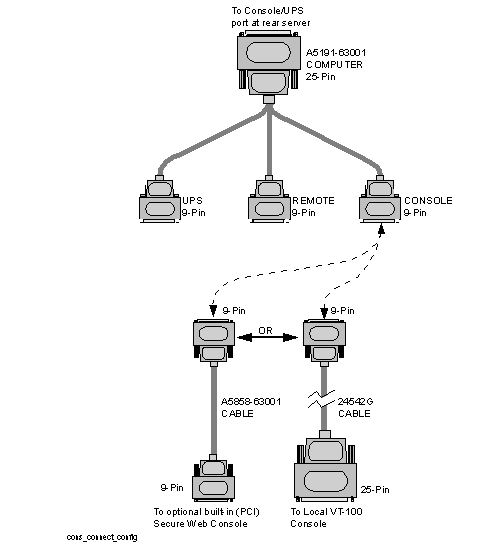
Figure 1-4 Console Connection and Configuration

Console Connection and Configuration

rp24xx Server RS-232 System Local Console Installation

The following describes how to install a system console on an rp24xx Server. The HP-700 series terminal is used as an example. Other terminals may be used as a system console as long as they are configured for VT100 terminal emulation mode.

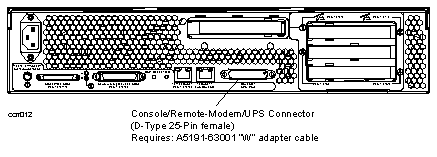
  1. Connect the 25-pin end of the A5191-63001 adapter cable to the 25-pin connector on the Console/UPS Port located on the rear.

  2. Connect the 9-pin, “Console,” connector of a A5191-63001 adapter to the 9-pin D-type connector on a 24542G RS-232 cable.

    Figure 1-5 Console/Remote-Modem/UPS Connector

    Console/Remote-Modem/UPS Connector
  3. Connect the 25-pin end of the 24542G serial cable to the serial/RS232 port on the Console. (RS232 Serial Port labeling may vary depending on manufacturer.)

  4. Connect the System Console to input AC power.

  5. Turn the System Console AC power switch to ON.

Console Configuration (VT100 mode)

The following describes the steps required to configure system consoles for VT-100 mode for operation with the rp24xx server.

C1099A VT-100 Mode Configuration.

The following procedure outlines the steps to configure the C1099A terminal for VT-100 operation.

To access the Setup menu in HPTerm emulation:

  1. Press the F10 key to display the terminal local function labels, then Press F8 (config keys).

    You are now in the Quick (F1) menu.

  2. Select the VT100 emulation by using the space bar to navigate through the available options.

  3. Press the ESC key to save selected setup parameters and to exit the Setup menu.

  4. Press the Y key when the blinking prompt

    	Save all? (Y/N)

    appears in the upper right corner of the menu to save the settings in non-volatile memory.

    NOTE: If you enter N when the
    Save all? (Y/N)

    prompt appears, the changes will take effect, but will be lost if the terminal is reset or powered off.

HP700 VT-100 Mode Configuration

The following procedure outlines the steps to configure the HP700 series terminal for VT-100 operation.

NOTE: You may use either the arrow keys or the tab key to move between the setting options on the screen.

Be sure to save any configuration changes you make before proceeding to a new menu.

  1. Press [User System] key.

  2. Press [config keys] function key. [f8]

  3. Press [terminal config] function key. [f5]

  4. Move to Terminal ID and enter “vt100”.

  5. Move to TermMode and, using the [Prev] and [Next] keys, select “EM100”.

  6. Save the configuration. [f1]

  7. Press the [config keys] function key. [f8]

  8. Press the [ansi config] function key. [f6]

  9. Move to multipage and, using the [Prev] and [Next] keys, select “yes”.

    (Enables screen scrolling).

  10. Move to Backspace Def and, using the [Prev] and [Next] keys, select “Backspace/Del”.

  11. Move to EM100 ID and, using the [Prev] and [Next] keys, select “EM100”.

  12. Save the configuration.[f1]

rp24xx Server Optional PCI Web Console Cable Setup

The following describes how to install the cabling for the optional built in (PCI) web console:

  • Connect the 25-pin end of the A5159-63001 adapter cable to the 25-pin connector on the Console/UPS Port located on the rear of the rp24xx server.

  • Connect the 9-pin, “Console”, connector of a A5159-63001 adapter to a A5858-63001 adapter.

Plug the other end of the A5858-63001 adapter to the 9-pin connector on the optional built-in PCI web console card.

Printable version
Privacy statement Using this site means you accept its terms Feedback to webmaster
© 2002-2004 Hewlett-Packard Development Company, L.P.