Jump to content United States-English
HP.com Home Products and Services Support and Drivers Solutions How to Buy
» Contact HP
More options
HP.com home
hp rp2400 Series of Servers Basic Cable Connections > Chapter 1 HP rp2400 Series of Servers - Basic Cable Connections

Front Panel Controls and indicators

» 

Technical documentation

Complete book in PDF
» Feedback
Content starts here

 » Table of Contents

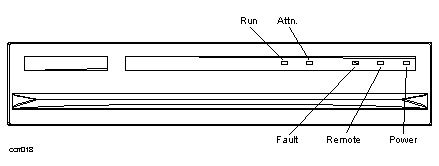
The following section describes the controls and LED indicators at the front of the rp24xx Server as shown in the following graphic:

Figure 1-2 Controls and LED Indicators

Controls and LED Indicators
  1. (Green) RUN LED - When lit, indicates that the system is powered-up.

  2. (Amber) Attention (ATTN) LED - When lit, indicates that a condition exists that requires operator attention and assistance from HP Support.

  3. (Red) Fault LED - When lit, indicates that a condition exists that requires immediate operator action.

  4. (Amber) Remote LED - When lit, indicates that the remote ports are active.

  5. (Green) Power LED - When lit, indicates that the system has DC power enabled.

NOTE: For technical support please call your local support hotline or contact HP at http://www.hp.com/support.

Server External Connections

External devices are interfaced with the server by means of specific connectors located on the rear bulkhead. Exterior connections to the server include ports for:

  • Small Computer System Interface (SCSI) devices

  • System Console

  • Local Area Network (LAN) Console

  • LANs

  • Power Cord

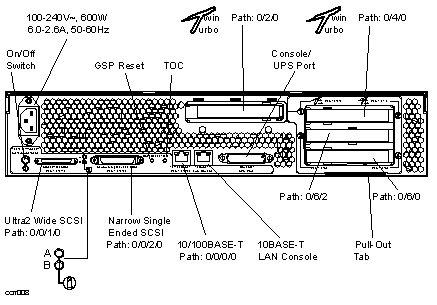
The graphic shown below illustrates locations of the external connections to the server.

Figure 1-3 External Connections to the Server

External Connections to the Server

Connect External Small Computer System Interface (SCSI) Devices

Connect external SCSI devices to the single ended SCSI bus (labeled: Narrow Single-Ended SCSI Path: 0/0/2/0) on the system card or to the Ultra 2 SCSI bus (labeled: Ultra 2 SCSI Path: 0/0/1/0).

Ensure that all devices on the SCSI bus have a unique address and the last device is terminated. Refer to the documentation accompanying each device to learn how to set addresses and where to place terminators.

Connect a System Console

NOTE: For more information on console configuration, refer to the rp24xx Hardware Manual (search on rp2400) at http://docs.hp.com.
  • Using the ASCII Terminal as a System Console. If an ASCII terminal is to be used as a console/UPS port, make sure that the keyboard is connected and a power cable is available.

  • Using a Secure Web Console PCI card as a System Console. If the Secure Web Console PCI card is to be used as a system console, first configure the Guardian Service Processor (GSP). For more information on GSP configuration, refer to the rp24xx Hardware Manual (search on rp2400) at http://docs.hp.com.

    Then, connect an RJ45 LAN cable to the Secure Web Console PCI card installed in an I/O card slot on the back of the server.

    NOTE: The Web Console has a default Internet Protocol (IP) address of 192.0.0.192 for rp2400 and rp2450 servers, and 127.0.0.1 for rp2430 and rp2470 servers. Make sure that no other device, including other rp24xx servers, has this address before connecting the server to your LAN.
  • Using the LAN Console as a System Console. If a LAN Console is to be used as a system console, first configure the Guardian Service Processor (GSP). For more information on GSP configuration, refer to the rp24xx Hardware Manual (search on rp2400) at http://docs.hp.com.

    Then, connect it to the system with an RJ45 LAN cable to the RJ45 connector labeled 10BASE-T LAN Console connection on the back of the server.

Connect the Core Local Area Network (LAN)

Connect the 10/100BASE-T Core LAN on the system board to the LAN with an RJ45 LAN cable. Connect the RJ45 LAN cable to the server by attaching it to the RJ45 connector labeled 10/100 Base-T Path: 0/0/0/0.

Connect Power Cords

Connect the power cord that is provided with the system to the server. For stand-alone servers, the power cord will be localized to each country’s power application. If an HP Uninterruptible Power Supply (UPS) is the power source, use the power cord provided with the UPS.

Connect power cords to all external devices at this time with the either the localized power cord, cabinet Power Distribution Unit (PDU) power cord, or the UPS power cord.

For cabinet-mounted servers, the server power cord connects to the PDU in the cabinet.

Printable version
Privacy statement Using this site means you accept its terms Feedback to webmaster
© 2002-2004 Hewlett-Packard Development Company, L.P.