chess-puzzles.md - www.codemadness.org - www.codemadness.org saait content files
(HTM) git clone git://git.codemadness.org/www.codemadness.org
(DIR) Log
(DIR) Files
(DIR) Refs
(DIR) README
(DIR) LICENSE
---
chess-puzzles.md (6557B)
---
1 This was a christmas hack for fun and non-profit.
2 I wanted to write a chess puzzle book generator.
3 Inspired by [1001 Deadly Checkmates by John Nunn, ISBN-13: 978-1906454258](https://archive.org/details/1001deadlycheckm0000nunn),
4 [Steps Method workbooks](https://www.stappenmethode.nl/en/) and other puzzle books.
5
6
7 # Example output
8
9 * English version: <https://codemadness.org/downloads/puzzles/>
10 * Dutch version: <https://hiltjo.nl/puzzles/>
11
12 Terminal version:
13
14 curl -s 'https://codemadness.org/downloads/puzzles/index.vt' | less -R
15
16 I may or may not periodially update this page :)
17
18 Time flies (since Christmas), here is a valentine edition with [attraction](https://lichess.org/practice/intermediate-tactics/attraction/)
19 puzzles (not only checkmates) using the red "love" theme.
20 It is optimized for his and her pleasure:
21
22 <https://codemadness.org/downloads/puzzles-valentine/>
23
24
25 ## Clone
26
27 git clone git://git.codemadness.org/chess-puzzles
28
29
30 ## Browse
31
32 You can browse the source-code at:
33
34 * <https://git.codemadness.org/chess-puzzles/>
35 * <gopher://codemadness.org/1/git/chess-puzzles>
36
37
38 # Quick overview of how it works
39
40 The generate.sh shellscript generates the output and files for the puzzles.
41
42 The puzzles used are from the lichess.org puzzle database:
43 <https://database.lichess.org/#puzzles>
44
45 This database is a big CSV file containing the initial board state in the
46 Forsyth-Edwards Notation (FEN) format and the moves in Universal Chess
47 Interface (UCI) format. Each line contains the board state and the initial and
48 solution moves.
49
50 The generated index page is a HTML page, it lists the puzzles. Each puzzle on
51 this page is an SVG image. This scalable image format looks good in all
52 resolutions.
53
54
55 # Open puzzle data
56
57 Lichess is an [open-source](https://lichess.org/source) and gratis website to play on-line chess. There are
58 no paid levels to unlock features. All the software hosting Lichess is
59 open-source and anyone can register and play chess on it for free. Most of the
60 data about the games played is also open.
61
62 However, the website depends on your donations or contributions. If you can,
63 [please do so](https://lichess.org/about).
64
65
66 # generate.sh
67
68 Reads puzzles from the database and shuffle them. Do some rough sorting and
69 categorization based on difficulty and assign score points.
70
71 The random shuffling is done using a hard-coded [random seed](https://en.wikipedia.org/wiki/Random_seed). This means on the
72 same machine with the same puzzle database it will regenerate the same sequence
73 of random puzzles in a deterministic manner.
74
75 It outputs HTML, with support for CSS dark mode and does not require Javascript.
76 It includes a plain-text listing of the solutions in PGN notation for the
77 puzzles.
78 It also outputs .vt files suitable for the terminal. It uses unicode symbols
79 for the chess pieces and RGB color sequence for the board theme
80
81
82 # fen.c
83
84 This is a program written in C to read and parse the board state in FEN format
85 and read the UCI moves. It can output to various formats.
86
87 See the man page for detailed usage information.
88
89 fen.c supports the following output formats:
90
91 * ascii - very simple ASCII mode.
92 * [fen](https://en.wikipedia.org/wiki/Forsyth%E2%80%93Edwards_Notation) - output FEN of the board state (from FEN and optional played moves).
93 * [pgn](https://en.wikipedia.org/wiki/Portable_Game_Notation) - Portable Game Notation.
94 * speak - mode to output a description of the moves in words.
95 * [SVG](https://en.wikipedia.org/wiki/SVG) - Scalable Vector Graphics image.
96 * tty - Terminal output with some markup using escape codes.
97
98 fen.c can also run in [CGI](https://en.wikipedia.org/wiki/Common_Gateway_Interface) mode. This can be used on a HTTP server:
99
100 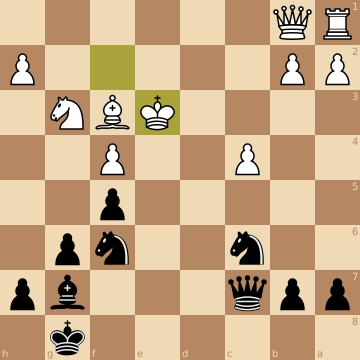
101
102 * <https://codemadness.org/onlyfens>
103 * <https://codemadness.org/onlyfens?fen=6k1/ppq3bp/2n2np1/5p2/2P2P2/4rBN1/PP3K1P/RQ6%20w%20-%20-%200%2023&moves=f2e3&flip=1>
104 * <https://codemadness.org/onlyfens?moves=e2e4%20e7e5&flip=1&theme=green&output=svg>
105 * <https://codemadness.org/onlyfens?moves=e2e4%20e7e5&output=pgn>
106 * <https://codemadness.org/onlyfens?moves=e2e4%20e7e5&output=speak>
107 * <https://codemadness.org/onlyfens?moves=e2e4%20e7e5&output=ascii>
108 * <https://codemadness.org/onlyfens?moves=e2e4%20e7e5&output=fen>
109
110 Terminal output:
111
112 curl -s 'https://codemadness.org/onlyfens?moves=e2e4%20e7e5&output=tty'
113
114
115 # Support for Dutch notated PGN and output
116
117 For pgn and "speak mode" it has an option to output Dutch notated PGN or speech
118 too.
119
120 For example:
121
122 * Queen = Dame (Q -> D), translated: lady.
123 * Rook = Toren (R -> T), translated: tower.
124 * Bishop = Loper (B -> L), translated: walker.
125 * Knight = Paard (N -> P), translated: horse.
126
127
128 # Example script to stream games from Lichess
129
130 There is an included example script that can stream Lichess games to the
131 terminal. It uses the [Lichess API](https://lichess.org/api). It will display the board using terminal
132 escape codes. The games are automatically annotated with PGN notation and with
133 text how a human would say the notation. This can also be piped to a speech
134 synthesizer like [espeak](https://github.com/espeak-ng/espeak-ng/) as audio.
135
136 pgn-extract is a useful tool to convert Portable Game Notation (PGN) to
137 Universal Chess Interface (UCI) moves (or do many other useful chess related
138 things!).
139
140
141 # Example script to generate an animated gif from PGN
142
143 Theres also an example script included that can generate an animated gif from
144 PGN using [ffmpeg](https://ffmpeg.org/).
145
146 It creates an optimal color palette from the input images and generates an
147 optimized animated gif. The last move (typically some checkmate) is displayed
148 slightly longer.
149
150
151 # References and chess related links
152
153 * chess-puzzles source-code:
154 <https://www.codemadness.org/git/chess-puzzles/file/README.html>
155
156 * Lichess FEN puzzle database:
157 <https://database.lichess.org/#puzzles>
158
159 * lichess.org:
160 <https://lichess.org/>
161
162 * SVG of the individual pieces used in fen.c:
163 <https://github.com/lichess-org/lila/tree/master/public/piece/cburnett>
164
165 * pgn-extract:
166 A great multi-purpose PGN manipulation program with many options:
167 <https://www.cs.kent.ac.uk/people/staff/djb/pgn-extract/>
168
169 An example to convert PGN games to UCI moves:
170 `pgn-extract --notags -Wuc`
171
172 * Lichess API:
173 <https://lichess.org/api>
174
175 * Stockfish:
176 Strong open-source chess engine and analysis tool:
177 <https://stockfishchess.org/>